
TOP > コンピュータ > ノートPCバッテリー道場 > ネタ
道場TOP ネタ一覧 ノートPCバッテリー道場
Why on earth would I pull out a Field PG M4 in a coffee shop?
- ◇評価 0ポイント
- ◇閲覧回数 7回
- ◇登録日
- 2026年10月21日
-
- ellabattery
- 道場主
Lv.25
The café table was a bit wobbly; as I set the Field PG M4 down, the surface visibly dipped under the weight. It tips the scales at 3.5 kilograms—official specs confirm it—housed in a magnesium-alloy chassis that feels cold to the touch, with rigid, unyielding edges. It’s a completely different species from the ultrabooks of today, which flex and deform if you so much as squeeze them. A person at a neighboring table glanced over, likely assuming I’d hauled a cash register out with me.
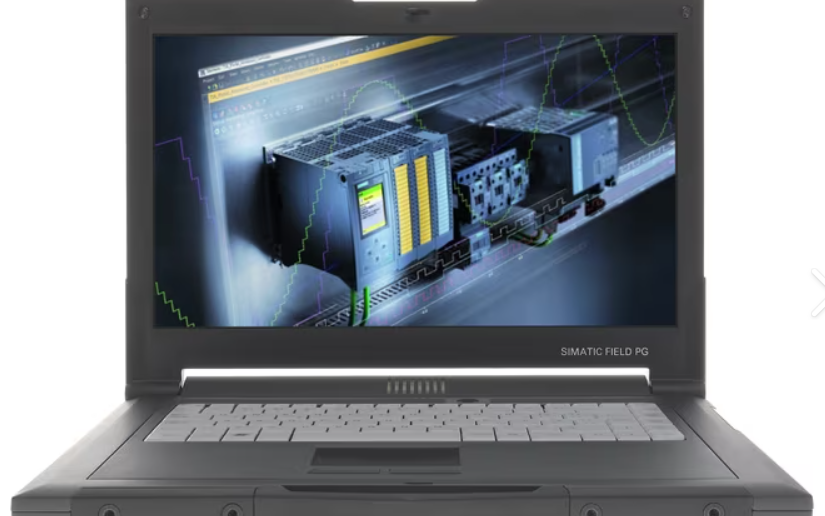
I sometimes wonder: what kind of person brings a Siemens industrial programmer—manufactured around 2012—into a shop that serves oat-milk lattes, just to get some typing done? The answer is simple: someone who happens to own one, and who really doesn’t feel like sitting stiffly at a desk to use it. The beauty of the M4 doesn’t lie in its raw power, but in its sheer, uncompromising stubbornness.
This stubbornness is remarkably tangible. Look at the side of the unit, and you’ll find a 9-pin D-sub port labeled "MPI/DP," capable of data rates ranging from 9.6 kbps all the way to 12 Mbps. While such a port might have been unremarkable in 2012, in 2026, it’s practically a piece of performance art. With a modern, slim laptop, connecting to an S7-300—or an ancient S5—is a hassle: you have to dig through a drawer for a USB-to-serial adapter, wrestle with drivers for half an hour, and sometimes even pray that the adapter is in a "good mood" that day. Not so with the M4. That port is built for exactly this purpose; plug it in, and the STEP 7 (or even the legacy STEP 5) software recognizes it immediately—no middlemen, no complications. Someone on a forum put it best: if you’re just drafting designs in an office all day, buying one of these is just making life unnecessarily difficult for yourself. But if you’re summoned to the factory floor in the middle of the night to face a stalled production line, you’ll be damn glad to have this slab of iron in your hands—rather than a laptop that requires you to install drivers on the spot. But let me be clear: the most peculiar thing about this machine isn’t the MPI port—it’s the dual-boot setup. The M4 could be configured from the factory with both Windows 7 and Windows XP, with Windows 7 on the C: drive and Windows XP on the D: drive. You might ask, "Windows XP—isn't that ancient history?" The answer is: ProTool. This legacy HMI programming software from Siemens can only run natively on the Windows XP (Win32) kernel. It won’t work on Windows 7, Windows 10, or even inside a virtual machine—Siemens doesn’t support those environments. Yet, for factories still using OP7, OP17, or even older operator panels—where the equipment is still functional and the production lines are still running—you simply *must* have a machine capable of running ProTool. A standard laptop won’t do, but the Field PG M4 will. That’s why, even though it’s long out of production, a "Premium Plus" model in decent condition can still fetch 3,000 to 4,000 euros on the second-hand market. It’s not because of its performance; it’s because certain legacy software has effectively "tethered" users to specific, aging hardware. You could call it a "legacy" of industrial software, or perhaps a form of "hostage-taking"—either way, that’s the reality.
Of course, in day-to-day use, it’s hardly a romantic experience. The official spec claims a battery life of "over 5 hours"—but that was back when the battery was new. Any M4 you find on the second-hand market today likely has a battery that starts a "countdown" the moment you unplug the power cord; some honest sellers even explicitly list "degraded battery life" in their descriptions. I’ve been sitting here typing for less than an hour, and the charge has already dropped from 87% to 61%. The keyboard isn’t exactly a joy to use, either—the key travel is long, but in that old-fashioned, office-equipment sort of way, producing a distinct *clack-clack* sound that feels completely out of place in a coffee shop. The 15.6-inch Full HD screen was considered high-end back in the day, but by modern standards, its brightness is mediocre and the viewing angles are nothing special—though, to be fair, you aren’t exactly buying this machine to watch movies.
And one more thing: it’s heavy. 3.5 kilograms might just be a number, but carry that weight on one shoulder for fifteen minutes, and your shoulder will remember it all too well. On online forums, users have complained about seven-year-old PGs—reporting issues like flickering backlights or freezing during startup—yet they keep right on using them. They can’t afford a replacement, and there’s no easy way to swap them out anyway. This reveals another side of the M4: it’s not an object that inspires a sense of "pride of ownership," but rather a tool that, once integrated into a specific workflow, becomes nearly impossible to extract. It’s been discontinued, spare parts are growing scarce, and official support is, at best, a matter of luck—yet as long as that old PLC on the factory floor is still running, the M4 keeps on breathing.
So, if you ask me whether it’s worth the trouble, I can’t give you a simple answer. It’s slow, heavy, has a pathetic battery, runs an archaic operating system, and feels like a cutting board in your hands. But if you happen to be the kind of person who, at two in the morning, needs to jolt a stalled S5 or S7-300 back to life, those flaws suddenly become tolerable—perhaps even a little endearing. It’s not a laptop for everyone; in fact, it barely qualifies as a "laptop" at all. It’s more like a specialized wrench—one that just happens to run Windows, features an Ethernet port, and lets you type out these scattered thoughts while you wait for a program to finish downloading.
Siemens 11.1V 8650mAh/97Wh SP304 Replacement Battery For Siemens Simatic Field PG M4
|
|
【キーワード】
登録されていません
|

|
  |
ブログ? そんなの必要ありません! 今日から、いきなりアフィリエイトスタート!
【まにあ道アフィリエイト】まにあ道ならAmazonアソシエイトIDを利用してネタを書くだけで、お気軽に始めていただけます。


 Why on earth would I pull out a Field PG M4 in a coffee shop?(0)





 シュリのおすすめネタ
 この道場の人気ネタ
-

Buy SANYO UR18500Y SANYO 3.7V 1300mAh/... -
Buy BAOFENG LF-N8 BAOFENG 3.7V 4800mAh... -
Buy PWITHE V9 Lithium-Ion Batteries Si... -
Buy MOTOROLA RL60 Smartphone Batteries... -
Buy HUAWEI HB351731EFW Smart Watch Bat...
このネタをソーシャルブックマークに登録する
 まにあ道の人気ネタ
-
ウサビッチ キレネンコのキレ場面集 -
FHPK26106133P Tablet Battery for Black... -
New battery IBR009NA 5000mAh/19Wh 3.8V... -
惜しい凡作「ひとひら」 -
High quality SUNMI 3000mAh/11.4Wh 3.8V...
コメントはまだありません。