
TOP > コンピュータ > machii-little道場 > ネタ
道場TOP ネタ一覧 machii-little道場
What sets the Zebra ET55 apart from the ET50?
- ◇評価 0ポイント
- ◇閲覧回数 8回
- ◇登録日
- 2026年10月19日
-
- machii-little
- 道場主
Lv.31
Any discussion regarding the Zebra ET50 and ET55 must begin with a key fact: Zebra has designated both models as "End of Service Life" (EOSL), meaning the company no longer provides service or support for them. Consequently, if you currently own one—or are considering purchasing one on the secondary market—it is no longer a device suitable for long-term, reliable use. Nevertheless, these tablets embody certain design trade-offs characteristic of enterprise-grade hardware, which remain worth examining even today.
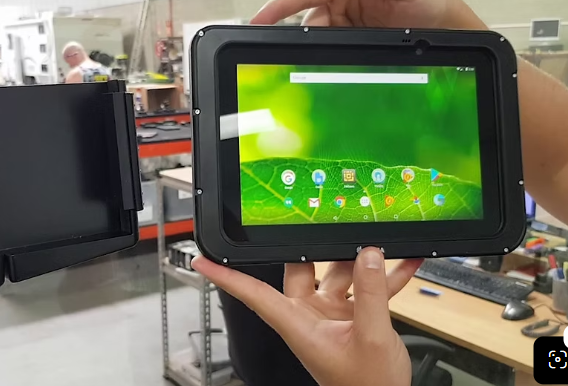
The difference between the ET50 and ET55 is almost comically minor: the ET55 includes 4G LTE connectivity, whereas the ET50 is limited to Wi-Fi. In terms of screen size, processor, memory, and operating system options, the two models are identical. Therefore, the choice between them isn't a matter of product features, but rather whether your work environment offers reliable Wi-Fi coverage. In places like the corners of a warehouse, outdoor construction sites, or inside a moving vehicle—where Wi-Fi signals cannot reach—the ET55’s cellular connectivity becomes its sole reason for existing.
They come in two sizes—8.3 inches and 10.1 inches—both featuring a 1920×1080 resolution. The 8.3-inch model boasts a pixel density of 262 dpi, making it even sharper than the iPad Air 2, while the 10.1-inch model, at 218 dpi, remains very crisp. Brightness levels also differ: the smaller screen offers 440 nits, while the larger one provides 350 nits. While 440 nits is sufficient for indoor use or shaded outdoor areas, the 350-nit display struggles significantly under direct sunlight. The "readable indoors and outdoors" claim is achieved through a specialized anti-reflective lamination process rather than sheer brightness. The screens are protected by Gorilla Glass 3 and support touch input even when the user’s hands are wet or gloved—a practical distinction in touch-interface design that separates enterprise tablets from consumer-grade devices.
The weight, in particular, is worth noting. The 8.3-inch model weighs 1.2 lbs (approx. 544g), while the 10.1-inch model weighs 1.55 lbs (approx. 703g). While only marginally heavier than consumer-grade tablets of the same size, that extra weight—a little over 100 grams—becomes quite noticeable if you’re holding the device in one hand to scan barcodes all day; by the third hour of the afternoon, you’ll definitely feel it.
The difference between the Windows and Android versions isn’t just a matter of OS preference—it’s about performance headroom. The Android version runs on a 1.9GHz quad-core processor with 2GB of RAM and 32GB of eMMC storage, whereas the Windows version features a 2.4GHz processor and more generous RAM and storage options. Because Android is less resource-intensive, it actually delivers more stable responsiveness on the same Intel Bay Trail platform. The Windows version can run traditional desktop software, but at this power-consumption level, opening a few extra windows or running background tasks—like antivirus software or synchronization tools—will lead to lag much sooner than it would on the Android version. This doesn’t mean the Windows version is unusable; it just means your expectations should be calibrated toward running a specific, dedicated Windows business application, rather than using it as a miniature laptop.
The philosophy behind enterprise-grade accessories is clearly reflected here: most of what you need isn’t in the box. Barcode scanning isn’t built-in; you have to attach a "Zback" expansion module—housing an SE4710 or SE4750 scan engine—which connects via Micro-USB. As for power, the 8.3-inch model has a 5900mAh internal battery, and the 10.1-inch model has an 8700mAh one. There’s also an optional 6800mAh auxiliary battery that supports hot-swapping: if the main battery runs dry, the auxiliary battery keeps the device powered, allowing you to pull out and replace the main battery without the unit shutting down. With the expansion module attached, the 10.1-inch model’s total battery capacity can reach 15,500mAh. The design intent is clear: batteries can be swapped, but the workflow must never stop.
And that is precisely where the problem lies. Features like barcode scanning require a back-cover attachment, extended battery life necessitates an additional battery pack, and rugged protection calls for a protective case—components that rarely accompany the device itself on the secondary market. If you purchase a "bare" ET50, you are essentially getting an aging tablet—running either Windows or Android—that happens to have a decent screen, but is no longer supported. Its "enterprise-grade" status is largely realized through its ecosystem of accessories; the device itself is only half the equation.
Comparing the ET50/ET55 to consumer-grade tablets from the same era leads to a somewhat counterintuitive conclusion. In a review from that period, *Rugged PC Review* noted that the technological gap between enterprise and consumer tablets had effectively vanished. The ET50/55 utilized consumer-grade quad-core Intel processors, 1080p displays, and standard multi-touch technology. The premium paid for an "enterprise-grade" device bought you not necessarily more durable core hardware, but rather a commitment to a long product lifecycle, accessory expandability, and manageability—the Android version, for instance, included Zebra’s "Mobility Extensions" (Mx) for device management and data capture control. Once official support ends, the first two advantages—lifecycle commitment and manageability—are effectively nullified, leaving you with little more than the accessories and a still-functional display.
Consequently, the current reality is this: the value of an ET50/ET55 as a "tool" depends entirely on whether you already possess the necessary back-cover attachments, batteries, docking stations, and the specific software stack designed for your business operations. If you have a complete set of accessories, custom-built software, and are willing to accept the risks of using a device that no longer receives security patches or official repair support, then the features for which it was originally designed—hot-swappable batteries, glove-compatible touchscreens, and modular scanning capabilities—remain valid. However, if you are starting from scratch, bear in mind that Zebra has passed the baton to the ET51/ET56 series; for the ET50/55, that particular chapter has already come to a close.
Tablet battery AMME2415 For Zebra ET50 ET55
|
|
【キーワード】
登録されていません
|

|
  |
ブログ? そんなの必要ありません! 今日から、いきなりアフィリエイトスタート!
【まにあ道アフィリエイト】まにあ道ならAmazonアソシエイトIDを利用してネタを書くだけで、お気軽に始めていただけます。


 What sets the Zebra ET55 apart from the ET50?(0)





 シュリのおすすめネタ
 この道場の人気ネタ
-

I’ve been using my Lenovo S41-35 for n... -
Laptop battery L23M4PK4 LENOVO L23M4PK... -
Amazon Fire HD 10 (11th Gen) T76N2B -
Laptop battery B14GA RTDPART B14GA -
Replacement battery Lithium-ion batter...
このネタをソーシャルブックマークに登録する
 まにあ道の人気ネタ
-
女性漫画家の素顔公開 -
Superb Choice LARGE 01DQ0023-81 Compat... -
High quality SUNMI 3000mAh/11.4Wh 3.8V... -
Bateria CITIZEN CLB2016 30mAh 3.7V bat... -
佐野ひなこさん ~ブレイク必至のツインテール美女~
コメントはまだありません。