
道場TOP ネタ一覧 shoppq道場
After using the ASUS GX550 for a few months, here’s the honest truth
- ◇評価 0ポイント
- ◇閲覧回数 6回
- ◇登録日
- 2026年9月21日
-
- aline
- 道場主
Lv.23
I picked this machine up second-hand late last year—specifically the GX550LXS model with an i9-10980HK, RTX 2080 Super Max-Q, 32GB of RAM, and dual 1TB SSDs in RAID 0. I couldn't bring myself to pay the price for a brand-new unit, but I found a seller offering a used one in decent condition, so after a quick chat, I bought it.
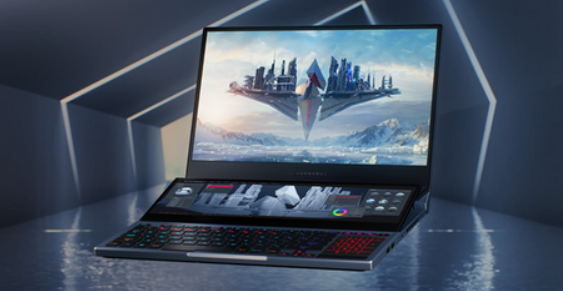
Let’s start with the first impression. I was genuinely impressed when I opened the box; I’d only seen the tilting secondary screen design in videos, but holding the actual device felt different. The secondary screen automatically tilts up by about 15 degrees and retracts when the lid is closed. The lid is metal, but to be honest, it’s a fingerprint magnet—someone like me with oily hands has to wipe it down constantly. The whole unit weighs around 2.5kg; add in that massive "brick" of a power adapter, and taking it out feels like a weighted workout.
The display situation needs to be broken down. The main screen is a 15.6-inch 4K IPS panel—60Hz, 100% Adobe RGB, and Pantone-certified. The colors are excellent; watching videos and editing photos is a great experience, and the brightness is sufficient. However, 60Hz feels a bit outdated in 2025. Having used high-refresh-rate screens previously, switching back makes the interface feel less responsive when browsing the web. The secondary screen is a 14.1-inch touchscreen with a 3840x1100 resolution; I mostly use it for chat windows, asset libraries, or monitoring temperatures. Once you get used to it, it’s hard to go back—having the main screen for work and the secondary screen for other tasks definitely boosts efficiency. That said, it’s not exactly indispensable.
I have to complain a bit about the keyboard and touchpad. Because the secondary screen takes up so much space, both the keyboard and touchpad are crammed into the bottom half of the chassis. The keyboard has 1.4mm of travel and feels rather soft; to put it kindly, it’s quiet, but to put it bluntly, it lacks tactile feedback. The arrow keys and function keys are pitifully small, so I often hit the wrong ones while gaming. The touchpad is located on the right; at 2.3 x 2.9 inches, it is ridiculously narrow. I barely used it—an external mouse is a must. Put simply, you make a genuine compromise on the typing experience to accommodate that secondary screen.
In terms of performance, the i9-10980HK paired with the 2080 Super Max-Q certainly isn't cutting-edge anymore, but it handles daily tasks and gaming just fine. I tested *Cyberpunk 2077* on medium settings with DLSS enabled, and the frame rate remained reasonably stable. The fans are audible—especially in performance mode—but not unbearably loud. When the secondary screen tilts up, it creates an intake gap underneath, resulting in better thermal performance than your average thin-and-light gaming laptop. However, there is one issue worth mentioning: the Type-C port only supports 65W PD charging. I was baffled when I first saw ASUS make that choice; competing models from MSI released around the same time offered 100W support. If you want to travel light with just a PD charger, you're limited to basic office work; for gaming, you still have to lug around that massive power brick.
The front-facing speakers consist of two 4W units. The sound quality is better than I expected—listening to music or watching videos isn't a painful experience—though the bass leaves something to be desired. If you really want an immersive audio experience, you're better off using headphones. It does come with an ESS Sabre DAC, so the headphone jack quality is decent.
The webcam situation deserves a special mention: there isn't one. We’re talking about a laptop at this price point in 2025 with no webcam. I rely on an external camera for video conferences, but the problem is that I occasionally forget to pack it, leaving me stuck. I still can't wrap my head around that design decision.
It has a 90Wh battery. In my actual usage—running dual screens at medium brightness while using a browser and document software—it lasted just over four hours. If you're gaming, you'll be hunting for a power outlet in little more than an hour. Discussing battery life on a machine like this is somewhat pointless; it’s best treated as a desktop replacement. In terms of ports, you get one USB-C (supporting Thunderbolt 3 and DisplayPort), two USB-A 3.2 ports, one HDMI 2.0b port, a headphone jack, and a Gigabit Ethernet port. Including two USB-A ports is generous, but having only a single USB-C port feels a bit stingy. You have to juggle charging and data transfer; I eventually had to buy a docking station just to make it workable.
Finally, let's talk price. I bought mine second-hand for about half the original cost. I recall someone mentioning they bought it for 13,000 yuan and sold it for around 6,000—the depreciation is indeed steep. If you're thinking of picking one up now, I suggest you carefully consider whether you actually need that secondary screen. If it’s just for the novelty, it’ll likely end up gathering dust after a while. However, if you genuinely have a need for dual-screen workflows—like keeping the timeline on the secondary screen while editing video, or the terminal there while coding—then it is genuinely useful; at the very least, it’s less of a hassle than carrying around an external portable monitor.
Overall, this machine is a bundle of contradictions. The secondary screen design is interesting and the thermal management is excellent, but the compromises made with the keyboard and trackpad, the lack of a webcam, and the single USB-C port are real downsides. It’s a device for someone who knows exactly what they want; if you buy it expecting "great value" or an "all-rounder" experience, you’ll likely be disappointed.
ASUS 5675mAh/90WH 15.4V C41N1906-1 C41N1906-2 Battery
|
|
【キーワード】
登録されていません
|

|
  |
ブログ? そんなの必要ありません! 今日から、いきなりアフィリエイトスタート!
【まにあ道アフィリエイト】まにあ道ならAmazonアソシエイトIDを利用してネタを書くだけで、お気軽に始めていただけます。


 After using the ASUS GX550 for a few months, here’s the honest truth(0)





 シュリのおすすめネタ
 この道場の人気ネタ
-

Musings on the Infinix X624/HOT7: Why ... -
New battery EF20-2S5000-S4L8 5000mAh/3... -
New Battery Laptop Batteries ASUS 15.4... -
Musings on the Infinix X624/HOT7: Why ... -
New battery V110HT 110mAh 1.2V for VAR...
このネタをソーシャルブックマークに登録する
 まにあ道の人気ネタ
-
日常の腕の動きで自動的に巻き上げが行われ -
フォンダンショコラの作り方&レシピ♪バレンタインデーに手作りしてみよう♪☆ -
100% New Compatible Battery for COMEN ... -
Akumulatory DRT-35R1003-batteria s... -
木彫り 馬の透かし トリベット 検:壁飾り・インテリア
コメントはまだありません。