
TOP > コンピュータ > machii-little道場 > ネタ
道場TOP ネタ一覧 machii-little道場
Precision 7540: A "Piece of Gym Equipment" You’ll Both Love and Hate
- ◇評価 0ポイント
- ◇閲覧回数 6回
- ◇登録日
- 2026年9月16日
-
- machii-little
- 道場主
Lv.31
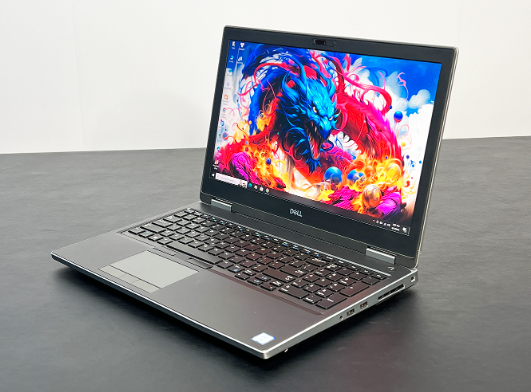
It’s my habit to weigh a workstation on the kitchen scale before reviewing it—this method offers a more intuitive sense of the machine than simply looking at a spec sheet. When I placed the Precision 7540 on the scale, the reading hit 2.53 kg. Don't get me wrong; this isn't a flaw—it’s the machine telling you exactly what kind of device it is.
What kind of machine is it?
The 7540 is a 15.6-inch mobile workstation launched by Dell in 2019. While it is smaller than the 17-inch 7750, there were no compromises regarding expandability or thermal capabilities despite the reduced footprint. Official specifications support four SO-DIMM memory slots and up to 128GB of DDR4 RAM—a rarity for 15-inch laptops. Storage options include up to three M.2 2280 NVMe SSDs, or a combination of two M.2 drives and one 2.5-inch drive bay, depending on the battery configuration you choose.
Choosing the Processor and Graphics Card
Processor options for the 7540 span both the 9th Gen Core and Xeon lineups. The i5-9400H serves as the entry-level quad-core/eight-thread option, followed by the i7-9750H, i7-9850H, i9-9880H, and i9-9980HK, as well as the Xeon E-2276M and E-2286M. Both the 9850H and 9750H feature six cores and twelve threads with minimal differences in base clock speed; the 9850H offers a 0.1GHz higher boost clock and vPro support, though the difference is barely noticeable in real-world use. The i9-9880H boasts eight cores and sixteen threads, delivering significantly higher multi-core performance—though it also generates considerably more heat.
As for graphics, the range is extensive, spanning from the Quadro T1000 and T2000 up to the RTX 3000 and even the RTX 5000. The T2000 features 4GB of GDDR5 memory and is positioned as a mid-range professional card; the RTX 3000 comes with 6GB of GDDR6, is based on the TU106 core, and boasts 2,304 CUDA cores, making it significantly more powerful than the T2000 for rendering and modeling tasks. In PassMark G3D benchmarks, the T2000 scores around 7,200 points, while the RTX 3000 scores approximately 10,600.
Port density that still holds its own today
The left side houses two Thunderbolt 3 ports and a USB-A port; the right side features an SD card slot, a headphone jack, and two more USB-A ports; the rear includes Mini DP, HDMI 2.0, an RJ45 Ethernet port, and a round power connector. You can connect monitors, hard drives, and network cables without needing a docking station. This kind of port configuration is becoming increasingly rare on modern laptops—a design feature worth missing.
Thermal management: Some tinkering is required
Out of the box, the 7540's thermal performance is less than ideal. Users have reported that the RTX 3000 can hit 100°C under full load, causing fans to spin at maximum speed and sometimes even triggering a system shutdown. A Reddit user shared a solution: using the `nvidia-smi -pl` command to limit GPU power consumption from 80W to 50–55W, which dropped the GPU temperature from 100°C to 75–80°C under heavy load. For the CPU, ThrottleStop can be used to limit power to 30–35W, bringing temperatures down from 100°C to 65–75°C—though this comes at the cost of a roughly 20% performance drop. There is also a free, low-tech trick: propping up the rear with a thin book or a pencil placed beneath the screen hinge increases airflow intake at the bottom, yielding surprisingly effective results.
A design that makes your blood pressure rise
The CMOS battery. This coin-sized battery is buried deep within the motherboard; replacing it requires removing the keyboard, unscrewing over a dozen screws, and disconnecting multiple ribbon cables. A user on the official Dell forums described the process as "unbelievably arduous," even posting YouTube links to show that—without video guidance—it’s impossible to figure out where to even begin. To make matters worse, the official manual specifies the ML1220 (rechargeable), yet third-party vendors supply the CR2032 (non-rechargeable), creating a conflict in model specifications. If you wait until the CMOS battery dies before replacing it, you essentially have to tear the entire machine apart.
The "Bargain Hunting" Logic of the Second-Hand Market
Browsing Xianyu reveals four configuration tiers: i7-9750H with T2000 for around 2,199 RMB; Xeon E-2276M with T2000 for around 2,399 RMB; i7-9850H with RTX 3000 for around 2,599 RMB; and i9-9880H with RTX 3000 for around 2,799 RMB. The 2,599 RMB tier offers the best value—it delivers a significant GPU upgrade without compromising on CPU performance. While the i9 tier looks like the top-of-the-line option, it’s questionable whether the 7540 chassis can actually handle the i9 under full load without thermal throttling. The Xeon tier occupies an awkward middle ground; the E-2276M performs on par with the 9750H, so unless you specifically require ECC memory or vPro management, that extra 200 RMB isn't really worth it.
To Be Honest
I find it amusing—and a bit frustrating—whenever someone buys the 7540 thinking it’s a standard laptop, only to complain that it’s "too heavy" or the "fans are too loud." This machine starts at 2.5 kg, the fans sound like a jet taking off under default settings, and replacing the CMOS battery is a task akin to defusing a bomb. However, if you need a mobile workstation with native Thunderbolt 3 support, a 128GB RAM capacity, and room for three internal drives—and you’re willing to spend half an hour tweaking power limits and fan curves—the 7540 has virtually no rivals at this price point. I’ve used several Precision workstations, and every time I open one up to replace the thermal paste, I curse the Dell designers—yet I keep using them anyway. That is perhaps the fate of the workstation: it doesn’t win you over, but you can’t do without it.
Laptop battery NYFJH For Dell Precision 7530 P74F 7730 P34E Series Laptop
|
|
【キーワード】
登録されていません
|

|
  |
ブログ? そんなの必要ありません! 今日から、いきなりアフィリエイトスタート!
【まにあ道アフィリエイト】まにあ道ならAmazonアソシエイトIDを利用してネタを書くだけで、お気軽に始めていただけます。


 Precision 7540: A "Piece of Gym Equipment" You’ll Both Love and Hate(0)





 シュリのおすすめネタ
 この道場の人気ネタ
-

Replacement battery Bluetooth speaker ... -
Replacement battery Wireless mouse bat... -
Replacement battery Bluetooth speaker ... -
B150AE cell phone battery pack for SAM... -
Battery replacement for GIONEE BL-N400...
このネタをソーシャルブックマークに登録する
 まにあ道の人気ネタ
-
パク・シネ、ブサイク注意!?クロワッサンたい焼きに「美味しくて涙ぽろぽろ」 -
有名人の素顔公開 【デーモン小暮閣下 樽美酒研二 マツコデラックス など】 -
Computer Power Supply 4GJV9 For Dell V... -
【全国送料無料】OPPO K12 交換用バッテリー BLPB45 -
フランスのラグジュアリー分野で、最も成功したひとり、と言えるだろう。
コメントはまだありません。