
道場TOP ネタ一覧 shoppq道場
MateBook D 14: A laptop where you need to be clear about what you "don't" want
- ◇評価 0ポイント
- ◇閲覧回数 7回
- ◇登録日
- 2026年9月16日
-
- aline
- 道場主
Lv.23
I have a habit of reading through negative reviews before buying any electronic product. It’s not that I distrust positive reviews; it’s just that positive reviews tend to look alike, whereas negative reviews each have their own unique stories. After going through the negative reviews for the MateBook D 14, I gained a better understanding of where this machine fits into Huawei’s product lineup.
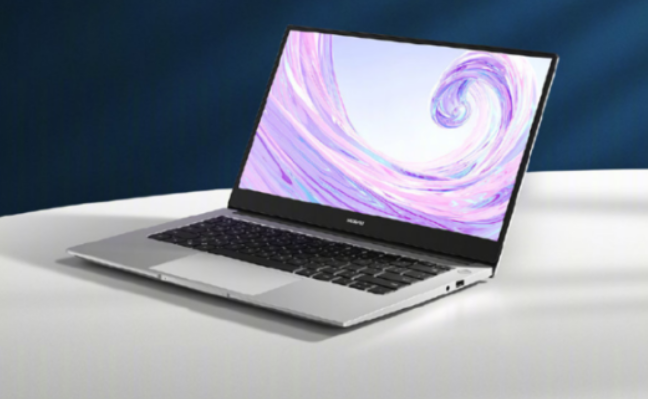
It’s the most affordable line in Huawei’s laptop family.
The D series is the entry-level tier of the Huawei MateBook family, sitting below the numbered series (like the MateBook 14) and the flagship X Pro. The 2024 model of the D 14 has been upgraded with a 13th Gen Core i5-13420H processor, 16GB of LPDDR4X RAM, and a 512GB NVMe SSD; the screen has shifted from the previous 16:9 aspect ratio to a 16:10 ratio with 1920×1200 resolution. It weighs 1.39 kg, measures 15.9 mm thick, and features an aluminum alloy chassis that feels more premium than its ~4,000 RMB price tag suggests.
The screen is one aspect that might give potential buyers pause. While the 100% sRGB color gamut and 300-nit brightness are perfectly adequate for indoor office work, it struggles in bright outdoor conditions—the measured brightness of 250 nits means you can basically forget about using it at an outdoor café table. To be fair, though, I never use my laptop outdoors anyway; direct sunlight renders any screen hard to see, so this shortcoming doesn't really bother me.
The port selection deserves a mention of its own.
On the left, there are two USB-A 3.2 Gen1 ports; on the right, there is one USB-C port (supporting only data transfer and charging), one HDMI 1.4b port, and a 3.5mm headset jack. The HDMI 1.4b port means that connecting to a 4K monitor limits you to a 30Hz refresh rate, resulting in noticeable screen tearing. The USB-C port doesn't even support video output, so if you want to connect an external monitor, you have to use the HDMI port.
What’s even more frustrating is that the two USB-A ports share bandwidth. Plugging in a single external hard drive yields a solid 420MB/s, but if you plug something into the other USB-A port, the speed immediately drops to 186MB/s. I still don't quite get the logic behind this design; I suppose the product manager assumed users wouldn't connect two high-speed devices simultaneously.
The real value lies in the software.
If you use a Huawei phone, the D 14’s "Super Device" feature is genuinely impressive. You can connect instantly via the Control Center, mirroring your phone screen directly to the PC and running up to three mobile app windows at once; features like drag-and-drop file transfers and cross-device copy-paste offer a seamless, native-like experience. I’ve met plenty of people who bought a Huawei laptop specifically for this feature—after all, once you’ve experienced this, you never want to go back to the days of shuffling files back and forth using WeChat’s "File Transfer" chat.
However, if you don't use a Huawei phone, the laptop's biggest selling point effectively vanishes. What remains is just an entry-level thin-and-light laptop with standard specs, a price that isn't particularly low, and a price premium driven by the brand name.
Pitfalls encountered by real users
A look at user complaints reveals issues primarily centered on hardware reliability. Some users reported that their hard drives became undetectable after less than two years of use, with replacement quotes hitting 959 yuan. There were also reports of automatic reboots under Windows 11—restarting again just minutes after booting up. Users of the 2022 model—such as teachers conducting online classes—complained about the webcam placement; it shot upwards from below the chin, creating a very unflattering angle. Those who wanted to buy an external webcam found that all the ports were already occupied, leaving nowhere to plug it in. Later models rectified this by moving the camera back to the top of the screen.
Is it worth buying? That depends on the phone you own.
At the same price point, you might consider the Lenovo Xiaoxin 14 (2025 model), which offers 24GB of RAM, a more comprehensive port selection, and more aggressive performance tuning. If you don't own a Huawei phone or need ecosystem-wide integration, the D 14’s competitiveness is merely average. But if your phone, tablet, and watch are all Huawei devices, that extra cost buys you a seamless ecosystem experience—a different kind of value proposition.
Having used Huawei phones for years myself, I’ve certainly come to rely on the Super Device feature. However, every time I see that the USB-C port on the D 14 only supports data transfer and charging, I can't help but feel that Huawei’s "feature-trimming" strategy for entry-level products is sometimes so precise that it’s actually a bit frustrating.
HUAWEI 3665mAh/56Wh 15.28V HB4692Z9ECW-41 7BGKAIJ411 Battery
|
|
【キーワード】
登録されていません
|

|
  |
ブログ? そんなの必要ありません! 今日から、いきなりアフィリエイトスタート!
【まにあ道アフィリエイト】まにあ道ならAmazonアソシエイトIDを利用してネタを書くだけで、お気軽に始めていただけます。


 MateBook D 14: A laptop where you need to be clear about what you "don't" want(0)





 シュリのおすすめネタ
 この道場の人気ネタ
-

New Battery Cordless Vacuum Batteries ... -
New Battery Laptop Batteries ASUS 11.5... -
High-compatibility battery CORE-M4 for... -
New Battery Tablet PC Batteries ASUS 7... -
New Battery Laptop Batteries HONOR 15...
このネタをソーシャルブックマークに登録する
 まにあ道の人気ネタ
-
パク・シネ、ブサイク注意!?クロワッサンたい焼きに「美味しくて涙ぽろぽろ」 -
有名人の素顔公開 【デーモン小暮閣下 樽美酒研二 マツコデラックス など】 -
Computer Power Supply 4GJV9 For Dell V... -
【全国送料無料】OPPO K12 交換用バッテリー BLPB45 -
フランスのラグジュアリー分野で、最も成功したひとり、と言えるだろう。
コメントはまだありません。