
道場TOP ネタ一覧 shoppq道場
Classic and Pragmatic: Reflections on Using the ThinkPad T470
- ◇評価 0ポイント
- ◇閲覧回数 361回
- ◇登録日
- 2026年8月20日
-
- aline
- 道場主
Lv.23
In an era where thin-and-light laptops are fully embracing the "fewer ports is better" philosophy, picking up the ThinkPad T470—originally released in 2017—actually gives me a long-lost sense of reassurance. It lacks stunningly narrow bezels and isn't light enough to casually tuck under your arm. Yet, as I slip it into my backpack and navigate the city to meet clients, draft proposals, and deliver presentations, I finally understand why a loyal group of users stubbornly sticks with the ThinkPad T-series.
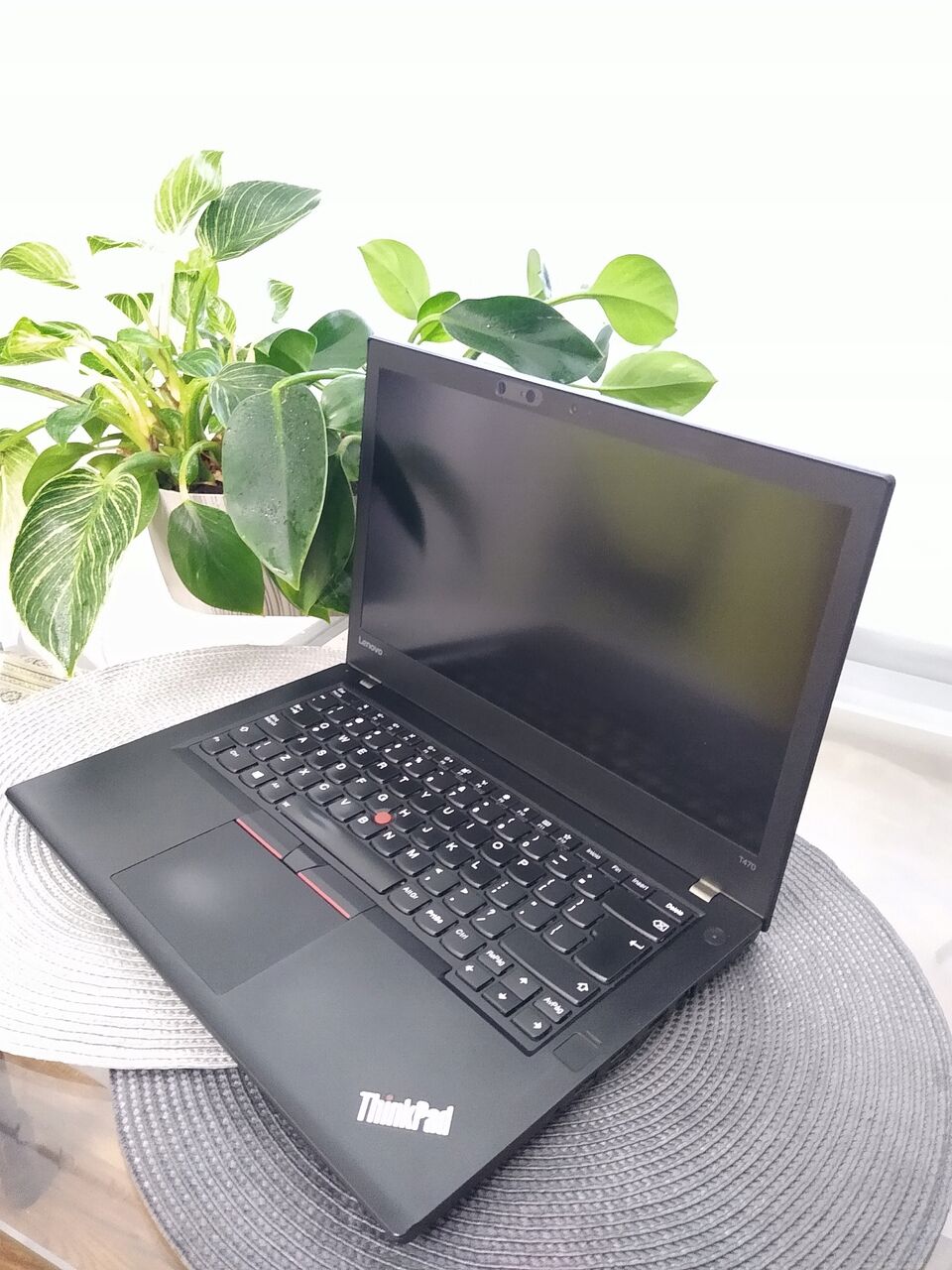
First Impressions: A Bit Thicker, Yet Solid and Reassuring
Weighing in at approximately 1.65 kg, the T470 is on the heavier side compared to today's 14-inch thin-and-light laptops. When I first took it out of my bag, I hesitated: would carrying it on business trips be a burden? After using it for a few days, however, that concern was replaced by a distinct sense of reliability.
The lid features the classic black soft-touch finish; it has a subtle matte texture and is resistant to fingerprints. The "TrackPoint" breathing light in the top-left corner and the ThinkPad logo in the bottom-right sit unobtrusively. The chassis has a boxy shape with slightly rounded edges, making it comfortable to hold without digging into your hands. The screen can be opened with one hand, and the hinge offers consistent resistance, remaining stable even when opened a full 180 degrees—no wobbling here.
When closed, it resembles a thick hardcover notebook. You can casually place it on a conference table, stuff it into an airplane seat pocket, or even slide it under a stack of documents—it’s tough enough to handle it. This sense of rugged dependability is something many trendy, ultra-slim laptops simply cannot offer.
Keyboard and TrackPoint: The Core of True Productivity
If there is one feature that makes the ThinkPad T-series unforgettable, it is undoubtedly the keyboard. The T470 sports a six-row layout with impressive key travel for a laptop; pressing the keys provides distinct cushioning and tactile feedback. Your fingers don't feel like they're tapping against a hard board, but rather pressing a responsive, springy button. When writing for extended periods, the fatigue in my fingertips is noticeably less than with many other ultrabooks I’ve used.
The keycaps feature a slight curve and a fine matte finish, showing much better resistance to the "shine" (oil buildup) common on older ThinkPad models. Although the arrow keys have been downsized, navigation keys like PgUp and PgDn remain on the right side—a layout that feels very natural for those who rely on keyboard shortcuts when handling documents.
The TrackPoint (the "red dot") is still here; paired with the three physical buttons above the touchpad, it allows me to work almost entirely without a mouse once I’m used to it. A gentle nudge of the red dot moves the cursor precisely without requiring me to move my hands away from the keyboard. The physical buttons provide a satisfying, audible "click" and feel more reliable than the click mechanism on integrated touchpads. I can even hold the laptop with one hand and quickly edit documents while on the subway—a scenario where a standard touchpad would be far less convenient.
The keyboard includes two levels of white backlighting; the brightness is soft and glare-free, making it perfect for typing at night with the lights off. It also features a spill-resistant design; I once accidentally knocked over a water glass, but the keyboard worked fine after I simply wiped the surface dry.
Screen: Adequate for work, but not for movies
The T470 unit I’m using has a 14-inch FHD IPS display with a brightness of around 250 nits. For daily office tasks—viewing documents, web pages, and spreadsheets—the text is crisp and viewing angles are solid; even when several people gather around to discuss something, those off to the side can still see clearly. However, its weaknesses become apparent when it comes to color and brightness: the color gamut is limited, the color temperature leans cool, and the peak brightness falls short when working near a window or in strong light.
With its 14-inch, 16:9 aspect ratio, the screen displays less vertical content than 3:2 or 16:10 displays, requiring more scrolling when working on long documents. Still, for someone like me who primarily uses Word, Excel, a web browser, and chat apps, the screen is perfectly acceptable. If you need to edit photos or videos, or watch movies, it will likely disappoint you.
Interestingly, the thickness of the laptop when closed ensures a "safety gap" between the keyboard and the screen, preventing the keys from leaving marks on the display. Although the screen bezels are wide, they actually help focus your attention on the on-screen content, avoiding the sense of visual crowding often caused by narrow bezels.
Performance: 7th Gen Core—still capable
The T470 is powered by an Intel 7th Gen Core processor; the unit I’m using features an i5-7200U, 8GB of RAM, and a 256GB SSD. While this configuration isn't exactly cutting-edge by today's standards, it is more than adequate for everyday office tasks.
I often keep over a dozen Chrome tabs open while running WeChat, DingTalk, and Outlook in the background, alongside a large Excel spreadsheet; switching between them is smooth, with virtually no noticeable lag. Although the SSD isn't a top-tier NVMe drive, boot-up, wake-from-sleep, and application launch times are snappy. Opening the lid wakes the screen in just one second—faster than many newer laptops.
The fan runs quietly during normal use, only spinning up during prolonged periods of high load. Noise levels remain acceptable and are barely audible in an office environment. While the bottom of the chassis and the left-side exhaust vent get warm, the keyboard deck stays cool, preventing sweaty hands during long typing sessions.
The T470 offers generous expandability for a business laptop. Accessing the internals requires removing just a few screws from the bottom; it features two RAM slots and supports either a 2.5-inch SATA drive or an M.2 SSD. For users looking to extend the lifespan of their device, this means plenty of room for upgrades and lower maintenance costs.
Ports: Everything you need—no dock required for business trips
The port selection is a major reason why I’m happy to carry the T470 with me long-term. The left side houses a USB-C port (supporting charging and data transfer), USB-A, HDMI, RJ45 Ethernet, and a combo headphone/microphone jack; the right side features two USB-A ports, an SD card reader, and a smart card reader (depending on the configuration). There is also a proprietary Lenovo docking connector on the bottom, allowing for a single-cable connection to multiple monitors in an office setting.
This level of connectivity is a rarity among today's thin-and-light laptops. When I visit client sites to debug equipment, I can plug in an Ethernet cable directly; if a projector only supports VGA, a simple HDMI-to-VGA adapter solves the problem; and I can plug in a USB drive, a mouse, and a phone charging cable all at once without needing a hub. I recall a time when a colleague’s ultra-thin laptop—equipped with only a single Type-C port—couldn't charge while connected to a projector; I simply handed over my T470, plugged in the HDMI and power cables, and work continued as usual. In that moment, practicality triumphed over all the flashy bells and whistles.
The USB-C port isn't Thunderbolt 3—it operates at USB 3.1 Gen1 speeds—but that is sufficient for driving an external monitor. For office-centric workflows, this is hardly a deal-breaker.
Dual Batteries and Battery Life: Peace of Mind When You're Out and About
The T470 features an interesting battery system: it has a built-in 3-cell battery paired with an external, removable battery (available in 3-cell or 6-cell options). My unit is equipped with the 6-cell external battery, offering substantial total capacity.
Under moderate office usage—Wi-Fi always on, 70% brightness, and handling documents and web browsing—it consistently lasts 7 to 8 hours. If you switch to power-saving mode and lower the brightness, getting through a full 8-hour workday is entirely possible. Crucially, the external battery is hot-swappable: you can remove the external battery and swap in a fully charged spare while the system is running, without the computer losing power. This design is a lifesaver for frequent travelers and those constantly on the move.
You can check battery levels within Windows or get a quick status update by pressing the battery indicator button on the side of the chassis. When the external battery is removed, the internal battery seamlessly takes over without any stuttering or system restarts. This sense of "infinite battery life" offers a level of reassurance that ultra-thin laptops with only internal batteries simply cannot match.
Details: The Unseen Commitment to Quality
The T470 upholds ThinkPad’s legacy of durability; it has passed multiple MIL-SPEC (military-grade) tests, ensuring it can withstand drops, vibrations, and exposure to high or low temperatures. I’ve taken it through rush-hour subway crowds and crouched on construction sites to revise blueprints; the chassis has a few minor dings, yet it runs perfectly. The hinge remains firm, with no looseness when opening or closing the lid.
Spill-resistant keyboard, shock-protected hard drive, power button integrated into the side, status lights discreetly tucked along the edge of the lid—these details may not stand out at first glance, but together they create a distinct "tool-like" quality. It doesn't aim to please the eye, but rather the hands and the needs of someone requiring reliable equipment.
Of course, there are downsides: the speakers are bottom-facing, resulting in thin, dry audio when playing videos; the screen bezels are wide, giving it a somewhat dated look; and the network of after-sales service centers in China is limited compared to top-tier consumer brands. Yet, for a laptop designed primarily for practical productivity, these issues seem acceptable.
Verdict: It’s not trendy, but it’s a solid choice.
After using the T470 for a while, I’ve come to view it as a quiet colleague: it doesn't seek the spotlight or show off, but when there’s work to be done, it reliably steps up to the task. A comfortable keyboard, a comprehensive array of ports, a flexible battery system, and strong expandability—these are qualities becoming increasingly rare in today’s laptop market.
It is ideal for those who carry their computer to meet clients daily, need to connect to various peripherals, value keyboard feel and ease of maintenance, and want a machine that will last for years. It is not the right choice for users who prioritize extreme thinness and style, ultra-long battery life, wide-gamut displays, or high-end multimedia entertainment.
The ThinkPad T470 isn't a laptop that makes you fall in love at first sight, but it is a productivity tool that becomes more satisfying to use over time. In an era where thin-and-light laptops are "slimming down" to the point of having only two ports, this seemingly clunky persistence has become a luxury of a different kind.
LENOVO 24wh 11.4V 01AV423 01AV427 Battery for Lenovo ThinkPad T470 T480 T570 T580
|
|
【キーワード】
登録されていません
|

|
  |

|
ブログ? そんなの必要ありません! 今日から、いきなりアフィリエイトスタート!
【まにあ道アフィリエイト】まにあ道ならAmazonアソシエイトIDを利用してネタを書くだけで、お気軽に始めていただけます。


 New Battery Surveying Equipment Batteries Topcon 7.2V 1400mAh/10.08Wh(0)





 シュリのおすすめネタ
 この道場の人気ネタ
-

New battery BA-0156A0 6000mAh/23.1Wh 3... -
New battery BAT21ZN1336000 6000mAh/23.... -
New Battery Laptop Batteries DELL 7.4V... -
Is a 2016 4K convertible laptop still ... -
New Battery Surveying Equipment Batter...
このネタをソーシャルブックマークに登録する
 まにあ道の人気ネタ
-
altissima qualità Batteria per AS... -
Acheter une RUGGEAR BL500IP Batterie S... -
Batería para DELL J7HTX 4342mAh/3... -
Buy RECENT RB-35 RECENT 7.4V 1150mAh/... -
日本煙油的口味選擇:經典與創新風味的完美搭配
コメントはまだありません。